

News
Company News
SERVOsoft® News
- SEW EURODRIVE publishes product data for new PxG® economy line
Jun 16, 2026 - SERVOsoft v4.7.110 Released!
May 17, 2026 - SERVOsoft v4.7 Released!
Feb 16, 2026 - WITTENSTEIN cyber motor
publishes servo drive
solutions in SERVOsoft
Sep 29, 2025 - SERVOsoft Cloud Released!
May 23, 2025 - Energy Storage Modules
Tutorial
Jan 12, 2025
SERVOsoft News
SERVOsoft® v4.7 Released
Feb 16, 2026
See highlights of the v4.6.530 release on Apr 4, 2025. For all release details, see the Revision Log.
SERVOsoft keeps racing ahead! Working with key players in the industry, this release includes many significant features. Normally, we may have 1 or 2 big projects with project partners. This release has 4 big projects with 4 project partners. And everything listed below is in both the Desktop and Cloud versions.
One thing is clear... SERVOsoft is the "hub" for key industry players to come together to develop the motion industry's number one sizing and modelling CAE tool!
In addition to the project partners mentioned below, a warm thank you to Mr. Alfred Sorger, our long-time SERVOsoft trainer in Germany, who does detailed testing and provides great feedback and SERVOsoft training!
Internal Permanent Magnet Servo Motor (IPMSM)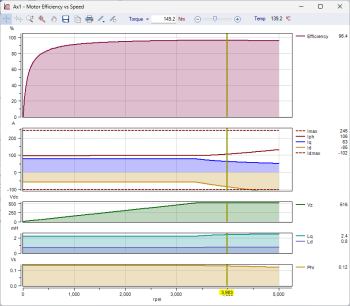
Working closely with Baumüller Nürnberg and SIMON Modellierungen, we developed an IPMSM motor model in SERVOsoft. An IPMSM is a hybrid Permanent Magnet and Reluctance motor. IPMSMs typically have 25-30% more power density in the same frame size compared to a PMSM. The trade-off is they are more difficult to control because the IPMSM model is non-linear with several multi-interdependent variables.
This was one of our most challenging and gratifying SERVOsoft projects. It is one thing to build an accurate IPMSM model. It is another to develop it in such a way that it computes "on the fly" in real-time. The project took almost a year with many failed solutions. The IPMSM model in SERVOsoft is very quick and very accurate, allowing for real time accurate modelling and sizing of IPMSMs. A remarkable achievement.
In the chart above right, the motor model is charted across its speed range, with efficiency in the 1st plot, currents including Iph and its vectors Iq & Id in the 2nd plot, bus voltage in the 3rd plot, inductance vectors Lq & Ld in the 4th plot, where (Ld-Lq) forms the basis of the reluctance torque, and finally is flux Phi [Vs] in the 5th plot.
At SPS Nürnberg 2025, Baumüller announced their new DS4 series IPMSMs, along with SERVOsoft being the only servo sizing tool that can accurately model and size their DS4 motors!
Cable DC Bus Sizing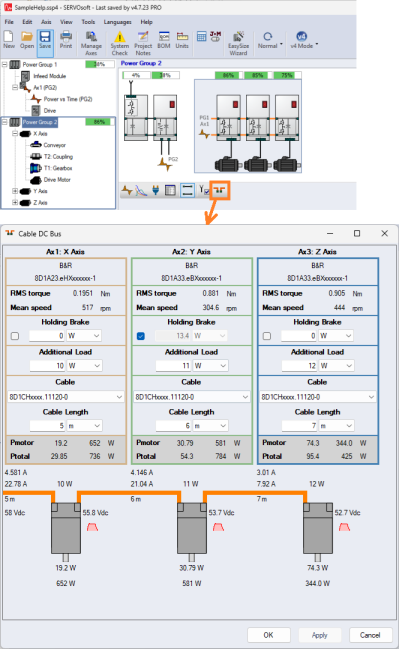
Working closely with B&R Austria, we developed the Cable DC Bus feature, which sizes DC Bus cables for remote Drive-Motors, aka Motor Integrated Drives (MiDs), located around the machine, connected by suitable cables in a daisy chain arrangement. The feature is also designed to size DC Bus Connector modules to support B&R's new ACOPOS M4 drives presented at SPS Nürnberg 2025.
Cables can be selected in the Cable DC Bus form, launched from the Main form as shown. This example shows Power Group 1, mounted in a cabinet, with an Auxiliary Power Module (APM) in Slot 2, stepping down the DC Bus from 540Vdc to 58Vdc to feed Power Group 2.
The cable length is an important factor in sizing the cables, as the total cable length of the daisy chain can result in signficant voltage dips further down the chain. Additional loads such as remote I/O and/or the motor holding brake can be added.
Quad Axis Drives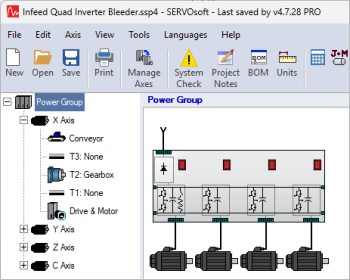
Added support for Quad Axis Drives including these variants:
- 4x Inverters
- Infeed+4xInverters
- Infeed/Bleeder+4xInverters
- Infeed/IntExtBleeder+4xInverters
- Infeed/Chopper+4xInverters
Note: All 4 inverters can have the same rating, or each inverter can have its own Imax & Icont rating.
Drive Inverter Efficiency Formula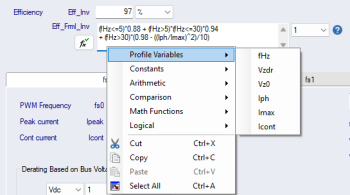
Added Inverter Efficiency Formula [Eff_Frml_Inv] to the Drives table, which allows for an efficiency formula based on:
- Output frequency [fHz]
- DC Bus voltage de-rating factor [Vdzr]
- DC Bus Nominal Voltage [Vz0]
- Output current [Iph]
- Rated max current [Imax]
- Rated continuous current [Icont]
If using Efficiency Formula, Efficiency value [Eff_Inv] must also be provided for backwards compatibility when a user opens a v4.6 or earlier project file.
Cart Mechanism Number of Driven Wheels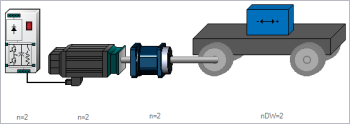
On the Main form, the Cart mechanism, now displays the number of driven wheels under the cart image. For example, if the number of driven wheels is 2, then 'nDW=2' is displayed.
In the example to the right, we have 2 complete drive lines in parallel, one for each driven wheel [DW].
Linear Actuator Bearing Life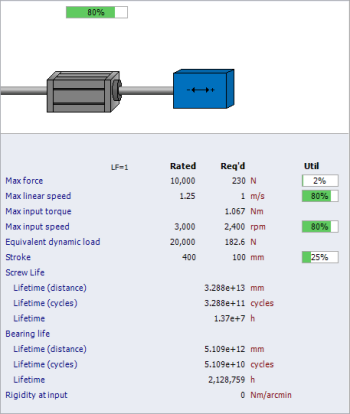
Working closely with Wittenstein cyber motor, axial load bearing lifetime calculations were added.
In addition to the Screw lifetime calculations, the Bearing axial load calculations were added with two new fields in the database:
- Bearings Dynamic Load Rating [Cb]
- Bearing Axial Load Factor [ab]
The two variables are used in these formulae:
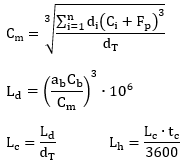
Where
| Cm | Mean load force | |
| Ci | Force step | |
| Fp | Preload force | |
| Cb | Bearing dynamic load rating | |
| ab | Bearing axial load factor | |
| di | Distance step | |
| dT | Total travel distance in a cycle | |
| tc | Cycle time | |
| Ld | Lifetime (distance) | |
| Lc | Lifetime (cycles) | |
| Lh | Lifetime |
Product Data Cache
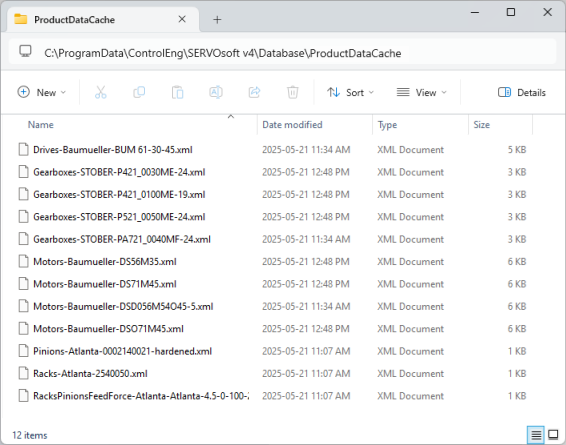
Added Product Data Cache feature that captures all product data imported from project files as well as entered using the Add/Edit Product forms. As such, product data is not lost after a database update. Product Data Cache files contain just the product data in encrypted form.
The cached files are in the active database folder's "ProductDataCache" folder at
C:\ProgramData\ControlEng\SERVOsoft v4\Database\ProductDataCache\
Product Data Cache Auto Sync
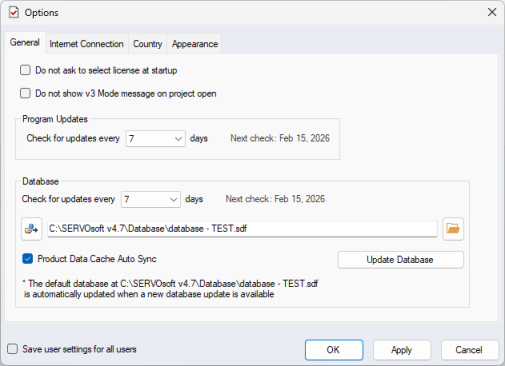
When Auto Sync is enabled in the Options form, all product data files in the "ProductDataCache" folder are automatically updated in the active database.
Move form: Accel/Decel Skew Factor for Motion Rules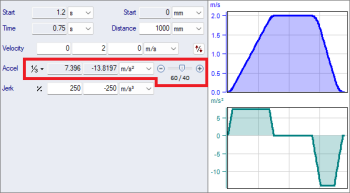
Added Accel/Decel Skew Factor to the Move form. Motion Rule Skewness is the asymmetry of Acceleration vs Deceleration. The Skewness slider is visible when a Motion Rule is selected.
The image to the right is an example of 1/3 Rule with 60/40 Skewness and Move Time T = 0.75s
- Accel + Decel = 2T/3 = 0.5s
- Accel = 60% x 0.5s = 0.3s
- Decel = 40% x 0.5s = 0.2s
Import Sequence form Adds More Options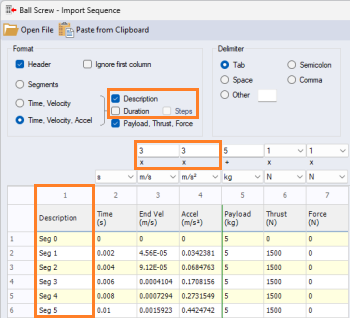
When 'Time vs Velocity' and 'Time vs Velocity & Accel', the following options were added
- Description column option
- Duration and Steps options
- Velocity and Accel Scale Factors
Descriptions Column Option
We've had lots of feedback about importing Time vs Velocity sequences with many samples without having any option to give each sample a 'Description'. Good point and long overdue. So finally, it is added.
Duration and Steps Options
The 'Duration' option simply means the time value is a duration instead of an absolute time value in the sequence. When 'Duration' is checked, you also have the option to specify if each segment will be interpolated (default) or handled as a 'Step' - a continuous velocity and load for the entire segment duration.
Velocity and Accel Scale Factors
This idea comes from one of our SERVOsoft Power Users at B&R, who often provides great feedback. He said "I often have to check and optimize the sizing of existing drive systems using motor traces. In most cases, a gearbox is also installed, which also should be adapted if necessary. For further consideration, the motor and gearbox must therefore be eliminated. The motor can be eliminated via “Add to payload”. This is more difficult with the gearbox. There is already a scaling factor for the torque, unfortunately, there is no scaling factor for the speed. With this small addition, an initial quick and dirty check would be possible without previous calculations in Excel." A simple but great idea solving a real world problem for many vendors. In the sample image above, the gear ratio is 3:1.
Print Report: IMCalc pages for Mechanisms and Transformations
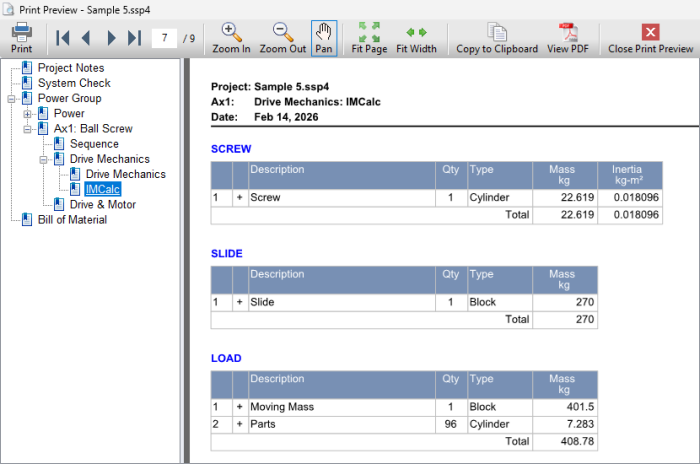
IMCalc details for Transformations and Mechanisms are included in the Print Report with dedicated pages. If there are many sub-elements, additional pages are added as needed in the Print Report.
Image below is from the Sample 5 project, with the Ball Screw mechanism 3 components defined by IMCalc - Screw, Slide and Load.
Formula Tester: Added Chart with Variable Sliders
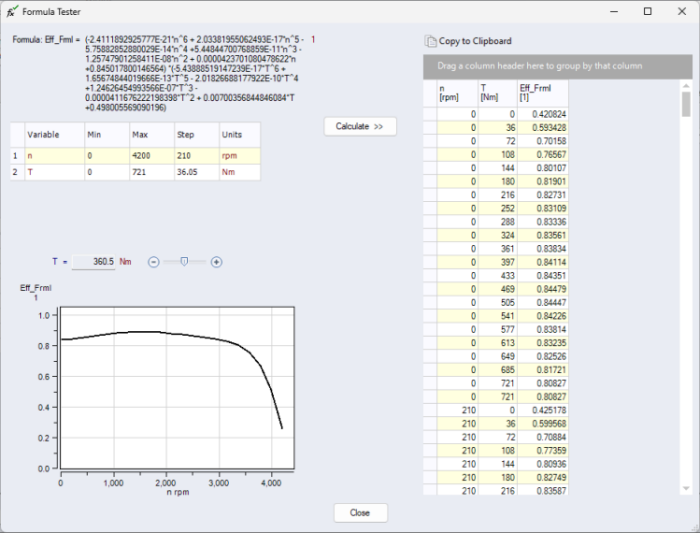
The Formula Tester form is used to test a formula with its variables in a range from Min to Max values with Steps. Invalid results, such as divide by zero, will be shown in the results table. Make sure to enter the range of variables and at a high enough resolution that will cover all cases the formula will be exposed to. Modify the initial Min, Max and Step values, then click the "Calculate" button and the results table will be populated with the computed values. The chart will be updated based on the table values, along with sliders to change the variables.
The example below shows a rather involved formula for the Gearbox Effiiciency, which varies with the variables input speed [n] and output torque [T].
Other New Enhancements
- Changed EXLAR version to CURTISS-WRIGHT version
- Main form
- Increased then max number of components in parallel from 20 to 99
- Motor Brake form
- Added additional column when more than 1 motor in parallel ie. n>1
- Sequence Profiles
- Added Lq, Ld & Phi profiles, specifally helpful for IPMSMs
- Slider Crank mechanism
- When at standstill, previously friction force was not considered. Now it is considered in the same way as for all other linear mechanisms
- Power vs Time chart
- Added Inverter Output Voltage and Current profiles to Inverter plot, which can be very helpful for Cable DC Bus sizing
- All Y Scale Labels are now 2 lines, with the units on the 2nd line, making multiple Y Scales on a plot more space efficient
- System Check
- Now handle Motor Ambient Temp lower limit
- Added System Check message for Motor, Drive, Infeed, Bleeder
"Minimum ambient temp exceeded"
- Added System Check message for Motor, Drive, Infeed, Bleeder
- Now handle Motor Ambient Temp lower limit
- Units
- Added the following Inertia units
- kg*mm²
- g*m²
- g*cm²
- g*mm²
- Added the following Inertia units
- Help
- Motor Models
- Added voltage and current formulae
- Added Product Data Cache page
Database
The SERVOsoft® database continues to grow with frequent updates, and now contains over 150,000+ products! Click here for a summary of the current products in the database.
If you are a vendor and want to add your products to the SERVOsoft® database and/or are interested in the Manufacturer Promotion Version, please contact us.